Batch for ComfyUI.
Inside your graph.
Four nodes that send any video in your graph to Batch and bring back ProRes mattes, depth or a 2x or 4x upscale, quoted before anything runs.
The work runs on Batch, not on your machine, so you don't need a big GPU. Same credits as Batch Portal.
One Batch workspace and one pool of credits across Portal, the API and ComfyUI.
Batch Roto V3.2, Batch Depth V3 and Batch Upres. ComfyUI jobs show up in Portal with everything else.
Every job carries a credit ceiling. If Batch quotes more, nothing is submitted.
Three services. One node.
Each job uses credits from your Batch account and is quoted before it runs.
Install the nodes.
Works in ComfyUI 0.3.45 or newer on macOS, Windows and Linux: Comfy Desktop, the portable build or a manual install.
Open ComfyUI Manager
In ComfyUI, open Manager, Custom Nodes Manager.
Search Batch and install
Install Batch: Roto, Depth & Upscale by batchfilm. Always take the latest release; Manager's nightly option isn't supported for this node.
Restart ComfyUI
Four nodes appear in the Batch category of the node library, and Settings gets a Batch section.
From a terminal
Then restart ComfyUI. No Manager on that machine? Download the package zip from the node's Registry page and follow its README.
One key. Saved once.
Make a key in Batch Portal
A workspace admin opens Integrations, API keys, Create key from the account menu at the top right of Batch Portal (in Portal 1.1.6 and earlier, API keys sit under Settings). Name it after the machine or artist that will use it, like "ComfyUI Edit Bay 2", and pick the ComfyUI preset: Read pricing, Submit jobs, Write artifacts, Read jobs and Read artifacts. Add Read billing to see your balance inside ComfyUI.
Copy the key. Portal shows it once. ComfyUI on Linux? Make the key in Batch Portal on a Mac or Windows machine, then use it on Linux. No Portal yet? Download Batch Portal.
Save it in ComfyUI
Open Settings, Batch, Connection, Set up Batch, paste the key and choose Save key.
The node checks the key with a read call that uses no credits, then keeps it in macOS Keychain, Windows Credential Manager or the Linux Secret Service. It is never written into a workflow. The dialog shows the workspace and the key it's connected to, so you can match the key prefix against the list in Portal.
On a server, in Docker or over a tunnel
Set up Batch works in a browser on the machine that runs ComfyUI. Everywhere else, set BATCH_API_KEY in the environment that starts ComfyUI, without typing the key on the command line:
python main.py
For a server that stays up, load BATCH_API_KEY from a file that just its owner can read, or from your secrets manager. A key in BATCH_API_KEY wins over a saved key.
Four nodes. Four templates.
Open Browse Templates and look under batch-film-nodes. Opening a template never submits anything.
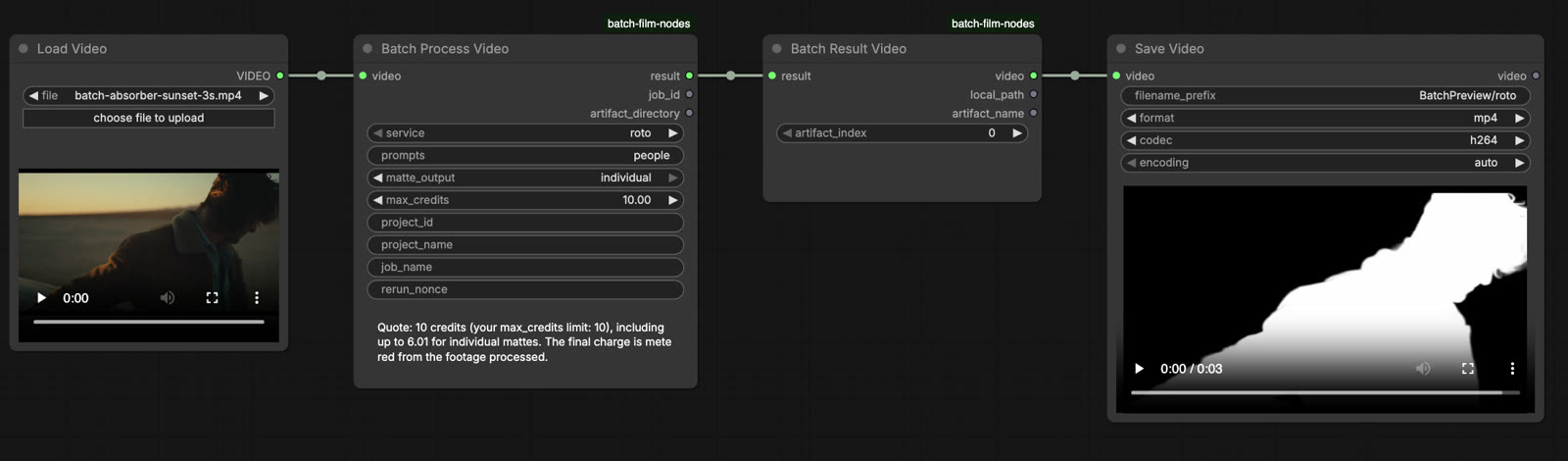
Pick a clip. Set a ceiling. Run.
Open a Batch template and pick your clip in Load Video.
On Batch Process Video, choose the service. The node shows just the controls that service uses.
Set max_credits to the most you'll approve for this job.
Run the workflow. Before it submits, the node shows the account it charges, the key prefix, the quote and, with Read billing, your balance. If the quote is above max_credits, nothing is submitted and the node tells you the ceiling you'd need.
Depth processes the whole picture and has no extra controls. While it runs, the node shows each step, and the ComfyUI console shows the same lines starting with [Batch]: uploading, checking the upload, queued, processing, complete, downloading.
ProRes back. Straight into the graph.
Results are ProRes movies, saved in ComfyUI's output folder under Batch/<job ID>/, for example ComfyUI/output/Batch/<job ID>/. Set BATCH_COMFY_OUTPUT_DIR to save them somewhere else.
Batch Result Video passes one movie on. For roto, index 0 is the combined matte. Batch Result Files gives you the path of every file. A Save Video preview is a copy; keep the originals for finishing. Need a matte as a mask? Batch Result Video, then Get Video Components, then Convert Image to Mask on the red channel.
Quoted before it runs. Capped by you.
Same credits as Batch Portal, same rates.
Nothing lost. Nothing charged twice.
The limits.
Need higher key limits? Write to support@batch.film.
Keep the key safe
When the node talks back.
Every message says whether a job was created and whether credits were used. Match the start of the message:
"Connect Batch in Settings > Batch > Connection, or set BATCH_API_KEY"
No key yet. See Connect above.
"Batch did not accept this API key"
The key is mistyped, revoked or expired. Make a new key and save it.
"This Batch API key is missing permissions the node needs"
Make a new key with the ComfyUI preset, save it, then revoke the old one.
"Batch API access is turned off"
A new key won't help. Write to support@batch.film.
"Your Batch account does not have enough credits for this job"
Add credits in Batch Portal under Credits and billing, then run again.
"Batch quoted ... more than this node's max_credits limit"
Raise max_credits to at least the quote shown, or use a shorter clip.
"This API key has reached its daily Batch credit cap"
Wait until 00:00 UTC, or write to support@batch.film.
"Batch roto prompts are single words separated by commas"
Rewrite the prompts: car, not red car.
"Batch upscale makes results up to 4096 pixels on the long edge"
Choose 2x, or resize the video before you run it.
"Batch could not inspect the video"
Install FFmpeg, or set BATCH_COMFY_FFPROBE to the full path of ffprobe, then restart ComfyUI.
"No Linux Secret Service is available"
Use BATCH_API_KEY instead (see Connect).
"[Batch] Another copy of the Batch nodes" in the ComfyUI console
An older copy is still in custom_nodes. Delete the folder the message names and restart ComfyUI.
ComfyUI Manager: "Installation of this flagged CNR version is blocked"
Manager blocks versions still in the Comfy Registry's review when ComfyUI is open to the network. Install from the package zip on the node page, use the terminal install above, or write to support@batch.film.
When you write to support@batch.film, include the job ID and the lines starting with [Batch] from the ComfyUI console. Never send your key. The README on the node page lists every message.
Install the nodes.
Run a shot.
Four nodes, four templates and one key from Batch Portal. Running ComfyUI across a studio? Write to lets@batch.film.
ComfyUI is the property of its owner. Batch is not affiliated with or endorsed by ComfyUI. Installing the nodes means you agree to the Batch Terms of Service, Privacy Policy and EULA.